Blogoversary Countdown!

Katherine Longshore 5 Saturday, July 30, 2011
Welcome to the countdown for our blogoversary special! On August 11 of last year, Talia wrote our very first post on this blog. But our association goes back further than that.

As many of you know, we met at the Big Sur children's writing workshop in December of 2009. Donna, Katy, Talia and Veronica were all in the same early-morning critique group session. We liked each other's work, we appreciated each other's talent, and we made plans to stay in touch.

During the same workshop, Bret and Katy were in a different critique group together. Because Bret is a conference junkie, we all came to know each other quite well, and everyone agreed he would be a good addition to the group.

When we started blogging, only two of us were agented. None of us had a book contract. And all of us were feeling our way by our toes in this huge wild sea that is the children’s publishing industry today.

We have come a long way. And we are so glad that so many of you have been here with us.

On Monday, you will see that exciting things are happening here on the blog.  But you'll have to wait until then to see what we mean.  In preparation, the blog will be down for part of the day tomorrow.

On Thursday, all of us are heading to the SCBWI conference in LA. So we are taking this week off. But that doesn't mean you'll have nothing to read. We will each be reposting our most popular posts. We see it as a kind of “best of" week.  The week after next, we'll be posting "Top Conference Moments" -- our view of the best parts of the 40th Anniversary of the SCBWI annual summer conference.

But the best is yet to come.

Be sure to check here on Thursday for the announcement of the incredible prize in a fabulous new contest. It not only celebrates our blogoversary, it also celebrates the payoff of all the hard work that goes into writing a novel for young adults.

Digital WHERE'S WALDO?

*Cue wavy dream-sequence lines and harp music*

Dream phone rings (Yes! It’s a yet-to-be-released iPhone 5).
I pick up. “Hello, this is Bret.”
“Heya, Bret. This is a BIG-TIME AMAZING EDITOR, but you can call me B-TAE.”
My palms turn into gloves o’ sweat, but I mange to hang on
to the phone and sit down at my desk. “Ummm…Hi, B-TAE. What can I do for –”
“Bret, we’re running out of time here. We’ve been reading your manuscript and LOVE it. The issue is that we’ve got to buy it in the next 2 minutes and the document stops at page 75…can you send us the rest of the book right now?”
“Oh, sure. Sorry…just one second.” I search my Gmail.
3,984 finds. Half of them are starred.
Oh no. Those aren’t even the current version. I had that on my thumb-drive. I think.
Wait, maybe I was working on my laptop at *bux?
Or was it on the old laptop at home?
Or did I make a couple notes on the iPad?
Or –
“Bret,” says B-TAE. “We need this now.”
“Sorry. Uh. Trying to find the current revision –”
“Never mind. Too late,” B-TAE starts to hang up the phone. “I hear Sarah Palin has a new picture book, I guess we’ll just go with that.”
“Wait!”
Click. The line goes dead with a squeal.
“Noooo!”
*I wake up soaked. Wife mumbles something about first drafts sucking and I should go back to sleep. Bailey’s tail flops once before continuing his own dream about delicious limestone. The nightmare ends.*

Ok, so maybe my nightmare is a tad farfetched (sue me, I’m a writer), but I’ve had times when finding the right version of something is a digital Where’s Waldo?. In today’s world, we have so many devices to work on – the home computer, the laptop, the work desktop, the iPad, and on and on. I can’t tell you how much it annoys me trying to track down the latest version of a manuscript or remember where I backed that file up or… any of those little organizational nuances that expose me to loosing a brilliant chapter and/or scrapping a genius idea.
Frankly, I want the current version on any device I can get my grubby hands on ASAP.
Is that so much to ask??
Until recently, it was. I tried many-a-things:
  • Emailing to myself – But it cluttered up the inbox and revision control is nearly impossible.
  • Thumb drives – They’re tiny and, therefore, find their way into the washing machine with ease.
  • Cloud-based storage lockers, like GoogleDocs and SkyDrive – Great in concept, but I found them clunky to use.
Then I found Dropbox.
And my world changed.
Dropbox, like SkyDrive and Google Docs, is a cloud-based digital storage service. Quick translations from Geek-ish: it’s like a locker accessible from any device connected to the internet.
These digital lockers provide several advantages. Files “in the cloud” are saved to a magnitude of places, not just a single server/hard drive, so the risk of a cataclysmic meltdown of ALL the servers is tiny. Additionally, every time something is saved to a cloud-based storage locker, it doesn’t overwrite the old version like it would on a thumb drive, but saves it as a new revision – a document that can easily be accessed again.
NOTE: Some folks voice concerns over security with these type of services, and rightly so. However, Dropbox has encrypted storage and is password protected, which is as safe or safer than emailing things to yourself. Of course, be cautious uploading highly personal information, as you always should be on the internet.

As I said, I’d used other cloud lockers before, so what makes Dropbox soooooo much better? The glaring reason is that it’s seamless with my everyday life. When I have to email myself a document or upload to a website or anything else, there’s a step waiting to be neglected. With Dropbox, it’s invisible. Here’s how it works:
  • You download the program onto each device (yep, they have apps for mobile critters).
  • As part of the setup, a file is created in the computer called (wait for it) Dropbox. (You can create your own sub-folder within the Dropbox folder).
  • And here’s the cool part: Anything – yes, ANYTHING – you save within this directory file gets saved to the cloud and downloaded onto EVERY device linked to my Dropbox account.
  • So now, I just set-up my files in the Dropbox folder on my hard drive and every time I save, it writes it to the cloud AND to all my other computers (i.e. I save my manuscript on my work computer and then open my Dropbox iPhone 5 App and, yippee, there is the latest’n’greatest.).
  • On top of all of that, you can also go into the Dropbox web page and access your files on any internet-connected device.
  • Bonus Feature: All old revisions of your documents or pictures are saved and easily accessed from the website.
  • Second Bonus Feature: Set-up a shared folders and drop larger files in there for a Critiquer to download (right, Katy?)
  • What’s that? How much does this amazing service cost? The first 2GB of data is free and then there’s a yearly charge for additional space.
Whew! Can you tell how much I *love* this thing? It’s removed one of those 10,523 worries and annoyances that are so keen on ruining a good sleep.
Oh, I better go…my iPhone 5 is ringing. Wonder if it’s B-TAE calling back to say Sarah Palin passed?
Another NOTE: Granddaddy Apple announced their iCloud service (another digital locker) will be available stating in the fall. I’m not 100% sure how it’ll work, but knowing Apple…it’ll be slick. Maybe I’ll let you know what I think when the time comes (assuming anyone cares).

Last NOTE (promise): Remember to high-tail it over here on Monday morning. We’ve got something AWE-AWE-AWESOME coming your way.

My Tools of the Trade

Veronica Rossi 9 Thursday, July 28, 2011
I love talking with other writers about our work tools. It makes me feel like we're very professional--like a pair of builders stepping back and talking about the materials used in framing a house. Or like artists, talking about linseed oil and brush bristles and the power of Thalo Blue. It really connects me with the fact that we create something. We are a league of builders. We are artists. So please grab your hard hat or your painter's smock and let's talk shop.
Here are my book creating tools:

iMac – My desktop computer with a huge screen that allows me to see two pages side by side at full size. I wrote UNDER THE NEVER SKY on a laptop—which was more than adequate—but for hours upon hours of writing, nothing compares to the elevated screen, the screen size, and the portable keyboard. Top marks. Wish I hadn’t waited so long to purchase one.
Mac Book Pro – This is the laptop I mentioned above. A great piece of equipment. Sleek and fast. At least it was when I purchased it several years ago. Now I’m eyeing the Mac Air.
That concludes the APPLE portion of this blog post (although it’s a struggle not to throw other items in here… iPhone, anyone? iPad? iThink i’M iCrazy for Apple.)
Harman Kardon Speakers – Reasonable price for how great these things sound. I’m almost always playing music when I write, so I use these daily. Score: 10 out of 10.
Scrivener – I could do a whole post on just this. I really like this writing software, particularly for early-stage writing, as it allows you to be very organized about story structure. I have yet to use Scrivener through the entire first to last draft process. I find that eventually, I need to move over to Microsoft Word, where I have a better sense of my place in the story. But for the days when you’re sitting down and banging out a scene, Scrivener is fantastic.
Now, let’s get a little lower tech, shall we? Here are other much-used items in my toolbox.
Post it Flags – perfect for revision work, and so pretty to look at. I could probably wallpaper my office with the amount of flags I used while revising UTNS. Love these.

Futuro Wrist Guards – I’ve blogged about these before. Wrist strain is a potential problem for anyone working regularly on a computer. I have a nice little ganglion cyst on my wrist (who said rhyming was out?) If you want to gross yourself out, Google it. Mine’s not too big—yet.
It’s just a teeny little nub right now. Bret and I like to call it my Alien Wrist Baby, because for a while there I worried it might spawn something. But thanks to the Futuro guard, I’ve got little junior under control.(Just trying to keep it real.)(But sorry if that just grossed you out.)
Feline/Canine Companion – These little items are key for the writing process. Not a cheap investment, and the upkeep is considerable, but no other product that I know of purrs or wags its tail when you ask them, “What do you think? Good line or stupid line?”
What are some of the items you rely on when you write?

Embracing Technology

Any writer who has been on submission, whether querying agents or having your manuscript out with editors knows how tied you can become to that refresh button.  Somewhere along the way my laptop moved into the family room and my writing email account got a permanent home on my cell phone.  Even when the process ends, it's hard to break the bond you've formed with your inbox, and stop twitter stalking certain agents and editors. 

And while I feel like I am finally recovering from my refresh addiction (although its a bit like dieting-you can't just give up email altogether), I find that I've also acquired a taste for gadgets.  It used to be that a trip out of town required a computer bag containing exactly one laptop,and a charger.  These days, I have a laptop, a netbook, an iPad and a Kindle.  Duplicative?  Maybe, but each serves a special purpose when it comes to meeting my writing goals.
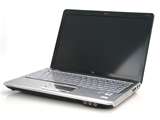
The Laptop:  This is my go-to computer for writing.  It's got my music library and playlists, my writing software and a big easy to read screen.  Most often, I can be found on the left corner of the couch clacking away while my real life love interest watches sports.  I like it because is big enough to work on for long periods of time (I typically write on weekends- in 6-10 hour stretches) without hurting my eyes and has a full size keyboard.  It has every version of my manuscript handy, as well as my outlines, and Scrivener files. 

I beta tested Scrivener for PC, and it had some wonderful tools to help me brainstorm a major rewrite.  It has a notecard/bulletin board function that I loved.  And while I enjoyed having the ability to keep every chapter and scene as a separate file, I also found the word processing functions to be lacking.  Eventually, I moved the outline into a Word document and charged ahead, but I still go back to Scrivener for my character and scene notes and folders, and I can see using it again to plan the next manuscript.

I utilize a simple back up system for my manuscript.  At the end of a writing session, I email myself the document, so it's safe and secure on a gmail server that I can access from any computer, even if my hard drive crashes.  I've also started using Dropbox, which allows me to store the latest version of the document in one easy to access location.

My laptop is the one bit of writing technology I could not do without.
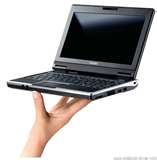
The Netbook:   I bought the netbook on a whim last fall before a cross-country trip.  My laptop is awesome, but it is too big to open from a coach seat.  The only way to write while flying was to snag an emergency row seat or bulkhead, which I could never count on.  Often times I ended up with my laptop in my laptop in my lap at a weird angle so I could see the half-opened screen.  I'm surprised I haven't done permanent damage to my wrists. 

I love that little Netbook.  It's portable and cute, and I feel comfortable writing on it in an airplane, a coffee shop, or just about anywhere.  The keyboard is small, and I had to try a lot of keyboards in the the store before I found the one that felt the most comfortable for me to type on.  The screen is also smaller, and that takes a little getting used to, but it's very manageable.  The netbook fits in my purse, and I can open it and work from any seat in the plane.  For $300, the netbook has already paid for itself in terms of productive writing time while traveling.
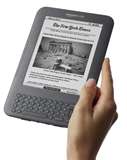
The Kindle:  I love e-books.  I know, don't tell anybody, okay?  I received a Kindle for Christmas, and I've read more books this year because of it.  At first, it felt a little impersonal and cold.  No beautiful cover?  All the books look the same on here?   After the first book I read, I thought that it could never replace a real book because it lacked personality.  Was I ever wrong.  It turned out that I didn't love the Kindle, because I hadn't read a book I loved on it yet.  Once I did, my feelings for the book started to transfer to the Kindle, and I realized that the magic of books is in the writing and story, not the form of delivery.  I love that I can buy books anywhere and get them instantly.  I can finish a book and download the sequel seconds later.  I can carry 500 books on a trip across country without breaking a sweat.  When I was on vacation earlier this year, I even read my Kindle at the beach in full sunlight.  

But the best part of the Kindle is that it accepts manuscripts in Word format, and allows you to make little notes as you read.  I love this feature, because it allows you to review your manuscript in a different format and font then you wrote it in.  In fact, it looks just like a real book!  It's easier to catch mistakes this way, and you can keep track of them as you go.  I reviewed an entire manuscript on a plane ride, and was able to keep track of the notes and incorporate them into the manuscript when I got home.  It's less expensive than printing, and it's easier to take on the road.  One caveat- the "keyboard" is tiny, and so extensive note taking is out of the question.  The Kindle works best at the final proofing stage.  I wouldn't recommend it when reading a manuscript before a big rewrite. 

I've used the Kindle to beta read others' manuscripts as well.  It's much easier than trying to read something on a computer.  This is a great tool in my writer's arsenal.  I wish I'd  had one sooner.
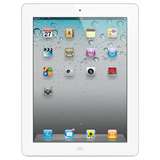
The iPad:  I know, laptop, netbook, Kindle, what do I need an Ipad for?  Let me tell you....  I got the iPad for work, but I'm finding that it's good for all kinds of things.  I use the iPad primarily for communication.  It's much better than the cell phone for checking email (not only does it refresh anywhere, but it allows you to actually read and respond without killing your eyes).  It's also my morning "paper" which I use to read blogs I follow and check out the state of things on Twitter (with the free Twitter app). 

I have a "Kindle" app which gives me access to my entire Kindle library on my iPad.  It seems redundant, but it's not.  The Kindle is great for everyday reading because it doesn't strain the eyes.  The iPad has a lit screen that is better for low light situations, and since my iPad is always in my purse, I can pick up the book I'm reading anywhere I happen to be.  The only issue I've had with reading a book on both devices is that the iPad and Kindle don't keep track of each other, so the books don't advance pages that you've read on the other device.  It's a minor inconvenience that's more than made up for by the convenience of having my books on hand at all times. 

The iPad also gives me internet access 24-7, without being dependent on wi-fi.  I know I had this with my smart phone, but it was always too slow and small to be any real use.   So far the iPad has been great for reviewing content, but I'm not sure it's the ideal tool for creating content.  That said, I did just get a wireless keyboard, and I'm going to download Pages and try working off Donna's set-up (*apologizes to netbook*).  I still think the netbook will be better for writing on the small confines of a plane, but I like the idea of using the iPad to write.

Last year, my writing technology consisted of one email account, one laptop and one work processing program.  This year, I've got three more gadgets, and I feel that they all have added to my enjoyment of the craft.

Just Tell Me What You Want to Say

Katherine Longshore 3 Tuesday, July 26, 2011

When we first started talking about having a technology-themed week, I thought I would write about 3 x 5 cards. They’ve become my new favorite toy for revision.

However, last week my husband e-mailed me with the subject header “I got you something”. Then he asked, “Can you guess what is?” I wrote back with the comment “Is it something that will wash the dishes while I type?”

His answer, “You’re closer than you think,” piqued my curiosity.

Ever since I worked as a travel agent I’ve had trouble with my carpal tunnel. Back then, I had to go through physical therapy. Luckily it was covered by workmen’s comp. I thought I had it fixed after round of acupuncture, covered by the NHS in England. But it seems to have come back, exacerbated by stress, so now I do everything: stretches, heat, ice, acupuncture, rest, exercise, massage. And most of the time it’s manageable.

But then my husband came home last week. With voice-recognition software. I have always hesitated about trying it. I think that I write much better than I speak. I’m more creative, I use better words, and I can think and type at the same time. I don’t always think while I speak. A fault, I know.

But I agreed to give this a try. I figured I could always use it for e-mails. If anything, it would save my wrists about 10% of the time.

The first e-mail I sent was to Veronica. When I said her name, the computer wrote barometer. I deleted that, and said her name again. The computer wrote Geronimo. This wasn’t working well.  So I did another round of voice training with it – reading a series of drastically redacted Aesop’s Fables and getting impatient (patience is not my strong suit).  But afterwards, the program got Veronica’s name right.  And Donna’s.  It spelled Bret’s with two t’s.  And I can’t figure out how to make it spell T-A-L-I-A instead of T-H-A-L-I-A.  But I don’t think that’s the program’s fault.

I'm more uncomfortable having my picture
 taken than having people read over my shoulder.
So for a week now, I’ve been speaking all of my e-mails.  Usually, I feel like a total loon, talking to myself with all the windows open. My kids like to come in and listen to me and watch the words appear on the page. Though I feel even more self-conscious about having people listen to me speak my writing than watching me write over my shoulder. I try to shut the door first.

I still don’t feel that my spoken voice comes as naturally to the page as my written voice does. Which sounds kind of crazy considering that we learn how to speak long before we learn how to write. But I do believe it takes a different mental muscle to type something you want to say than it does to speak what you want to say. Possibly this is because when we speak we are expecting to get something in exchange. At least, I don’t think most of us talk to ourselves for long periods of time. And even if we do, we usually answer ourselves back.

I don’t know if I’ll ever be able to write a book using voice recognition software. I somehow feel more creative when I am silent. But I am becoming more used to speaking my e-mails, usually feeling more comfortable when I imagine sitting across the table from the person to whom I am writing.

I have discovered today, however, that I can also write a blog post using voice recognition software. It feels strange, and I have to go in and delete some words manually, before typing in what I really meant to say.  I can’t tell right away if it has changed my written voice. Perhaps one of you can tell me if you notice anything different.

I think the more I work with the more comfortable I’ll get. And it certainly gives my wrists a rest. Which was exactly my husband’s intention when he came home with it.

Another way to support the writer in your life, right?

Writing with an IPad


I'm writing today's blog on an airplane somewhere between Chicago and Boston. The flight attendant just left my side after a long conversation (that elicited some glares from thirsty travelers around me). She stopped by my seat to ask me how I liked my IPad. It's a bit disconcerting to an introvert like me, but the IPad I use for writing, and the set up I've designed that works well for me, is quite the conversation starter for strangers. People have stopped me in coffee shops, meetings, airports and, yes, even on airplanes to ask about my IPad. I'm certainly not a technology expert, but it I do love to play around with new devices to assist me with my writing, and that's our topic for this week's blog - Technology for the Writer.

At first I wasn't particularly keen on getting an IPad, mainly because I'm a PC user and wasn't sure about working with Pages, IPad's word processing software. Everything I write is in Microsoft Word, and I needed to be able to seamlessly transfer documents between several different computers. After about six months, I'm completely won over. I LOVE my IPad! Below are some reasons and some things learned.

1) The set up of a simple portfolio stand with a wireless keyboard makes for a sleek, transportable work station (see picture above) that travels easily and sets up quickly. Everything is on one slim device--music, videos, email, internet and documents.

2) Pages imports and exports to Microsoft Word with ease. It also saves automatically, so I don't have to worry about losing the most recent version. I usually end each work session on my IPad by emailing myself a date stamped copy.

3) There are two small issues I haven't resolved yet. The "track changes" feature in Word doesn't work well in Pages. When you open a Word document with tracked changes in Pages, it automatically makes the suggested changes without you accepting them. Secondly, the word count is different. I have no idea why--to me a word is a word--but if word count goals are important, you should know they will be different from one application to the other.

Overall, the IPad has proved to be a fantastic writing tool and I would highly recommend it.

********And, finally, be on the lookout in the upcoming days for the FANTASTIC, GRAND, EYE POPPING, SUPERDEDOOPER, YAMuses blog surprise. Coming soon to an IPad near you!********
Grid_spot theme adapted by Lia Keyes. Powered by Blogger.

Search

discover what the Muses get up to when they're not Musing

an ever-growing resource for writers

Popular Musings

Your Responses

Fellow Musers

Translate